

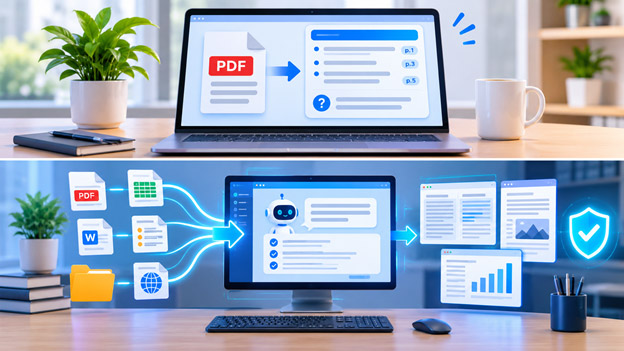
Reading digital documents has become a regular part of studying, researching, and managing business tasks. However, not every document requires the same level of attention. Sometimes, you only need a quick overview of a lengthy PDF. In other situations, you need to examine multiple files, compare information, extract important details, and turn your findings into organized documents. iBoomto offers different starting points for these needs, including an online PDF summarizer and a Windows-based AI document agent.
When You Only Need a Quick PDF Summary
Imagine receiving a 40-page research paper, business report, or industry analysis. Reading the entire document might take considerable time, especially when you only need its main arguments and conclusions.
This is where an online PDF summarizer becomes useful. Instead of manually scanning every page, you can upload your document and let AI identify the important information.
The iBoomto AI PDF summarizer provides a straightforward way to understand individual PDF files. Upload a document, allow the AI to process its content, and review a structured summary containing the major points.
The tool is particularly useful for:
- Students reviewing academic papers and textbooks.
- Professionals preparing for meetings.
- Researchers identifying important findings.
- Freelancers reviewing reference materials.
- Readers who want to understand lengthy reports more quickly.
Another helpful feature is source referencing. Summary points can include page references, allowing readers to return to the original document and check important information. You can also ask follow-up questions when you need clarification about a particular section.
For a one-time reading task, this approach is practical. You do not need to install desktop software or establish a complicated document workflow just to understand one PDF.
When Reading Becomes an Ongoing Workflow
A different situation develops when one document leads to several more tasks.
For example, a researcher might start with a market report, then examine competitor research, compare spreadsheets, extract information from presentations, and prepare a final report. Similarly, an office professional might need to review contracts, compare document versions, and organize information from multiple departments.
A basic summarizer may help with the first document, but a broader workflow requires more flexibility.
This is where desktop document AI becomes worth considering. Instead of treating every file as an isolated task, users can work with different types of source material and organize the results into useful outputs.
Evaluating iBoomto as a Windows Document AI Agent
For more extensive document work, iBoomto provides a Windows-based AI document agent designed to handle different file-related tasks.
Unlike a single-purpose online summarization tool, the desktop application brings document processing, AI assistance, PDF editing, and document generation together.
The iBoomto AI document agent supports workflows involving PDFs, Word documents, Excel spreadsheets, PowerPoint presentations, text files, images, and other common formats.
Its main advantages include:
Online and Local AI Models: Users can work with online AI models or choose local models that run directly on their Windows computers. Online models can provide access to more powerful processing options, while local models offer greater control over document processing.
Privacy and Security: Local AI processing is particularly useful when working with sensitive source materials. Original files remain stored locally, while certain online AI operations may transmit the content needed to generate results. Users should select the appropriate processing mode according to their privacy requirements.
No Token-Based Usage Charges for Local Models: Running supported local models does not require token-based payments or monthly usage allowances. This makes repeated document analysis more practical, although hardware capabilities and model context limits still apply.
No-Cost Local AI Processing: Users can access local models without paying per request. The Windows application also provides free features, while some advanced features and expanded processing access may require a paid plan.
These capabilities make iBoomto worth evaluating when document work extends beyond summarizing individual PDFs.
Turning Different Sources into Useful Results
A broader document workflow is not simply about reading more files. It is about connecting information and producing something useful from it.
For example, someone preparing a business report could begin by importing several research documents. They could ask AI to identify important findings, extract relevant figures, and compare information across different sources.
The resulting information could then be organized into a structured report or another document format.
Students can follow a similar approach by collecting course materials, summarizing chapters, identifying important concepts, and preparing revision notes. Professionals can use document comparison and extraction features to review proposals, contracts, and reports.
The advantage of a desktop agent is that users have more options for handling different stages of the process without constantly switching between unrelated applications.
However, AI-generated information should always be reviewed. Important figures, quotations, legal clauses, and research findings should be checked against their original sources before being used in final work.
Which iBoomto Starting Point Should You Choose?
The right starting point depends on what you want to accomplish.
If you have one PDF and simply need its main ideas, the online summarizer is the more direct option. It helps you understand a document without installing additional software.
If you regularly work with multiple documents, need different file formats, or want to create a repeatable reading and analysis process, the Windows AI document agent deserves a closer look.
Both approaches address different stages of document work. One makes individual reading tasks easier, while the other provides a wider environment for processing and organizing source material.
Final Thoughts
Choosing between a PDF summarizer and a complete document workflow depends on the complexity of your work. A quick summary is often enough for a single report, but ongoing research and professional tasks may require more advanced tools.
iBoomto brings these two starting points together through its online PDF summarizer and Windows AI document agent. With support for online and local AI models, document processing capabilities, and flexible workflows, users can choose a solution that matches their immediate requirements and expand their approach when their document needs grow.