

Creating attractive digital content is important for businesses, online sellers, marketers, and social media creators. A high-quality image can make a product listing more appealing, while a clear video can help communicate ideas more effectively. However, improving visual content often involves repetitive editing tasks, especially when working with images that need retouching or videos recorded in less-than-ideal conditions.
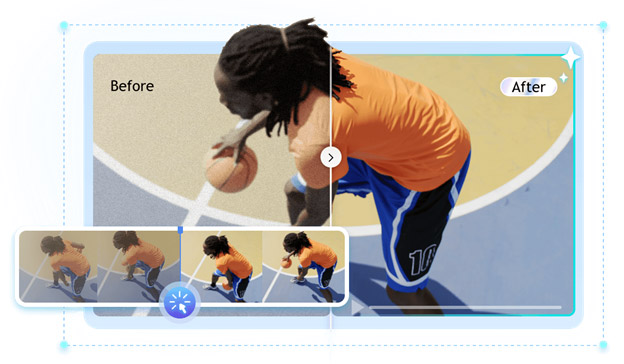
AI-powered tools are changing this process by making common editing tasks easier and more accessible. Instead of adjusting every detail manually, users can describe the changes they want or allow AI to analyze their media and recommend improvements. IObit offers online tools for both image editing and video enhancement, giving creators practical options for improving their visual content.
Why AI Is Becoming Useful for Everyday Editing
Traditional editing software provides extensive controls, but learning every feature can take time. Even simple tasks, such as removing an unwanted object or improving a blurry video, may require several editing steps.
AI simplifies some of these activities by recognizing elements within images and analyzing individual video frames. This can help users complete routine adjustments without needing advanced editing knowledge.
For example, an online store owner might need to remove distracting objects from product photographs, while a content creator may want to improve the clarity of an older recording. AI tools can help address both requirements through different editing processes.
Improve Photos with an AI Photo Editor
Images are often the first thing people notice when browsing websites, advertisements, and social media posts. Poor lighting, unwanted backgrounds, distracting objects, or low resolution can reduce the overall quality of an otherwise useful photograph.
An AI photo editor can make these improvements easier by using artificial intelligence to understand image content and apply requested changes.
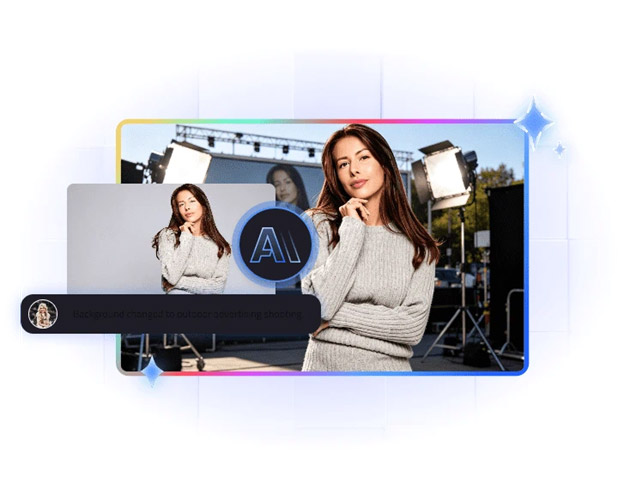
IObit’s online photo editing tool allows users to upload an image and describe the changes they want through text prompts. Instead of manually searching through complicated editing menus, users can explain their requirements and let the AI generate an edited result.
Some useful capabilities include:
- Object Removal: Remove unwanted objects, people, text, or other distracting elements from photographs.
- Background Removal: Separate the main subject from its background for product images and creative designs.
- AI Upscaling: Improve image resolution and make visual details clearer.
- Image Expansion: Extend the image canvas to create additional space around the original subject.
- Creative Adjustments: Change clothing, hairstyles, expressions, poses, and backgrounds through AI-powered editing.
These features can be useful for different types of projects. An online retailer might prepare cleaner product photographs, while a social media manager could adjust images for different content formats.
The prompt-based editing approach is particularly helpful for beginners. Users can describe the intended result rather than spending time learning complicated editing techniques.
Enhance Video Quality Without Complicated Editing
Images are only one part of digital content creation. Videos also require attention, especially when recordings contain noise, blur, poor lighting, or low-resolution footage.
A video enhancer can help improve existing recordings by analyzing visual information across video frames and applying automatic adjustments.
IObit’s online AI Video Enhancer is designed to improve video clarity and overall visual quality. Users can upload supported video formats and allow the tool to process their footage.
Its main capabilities include:
Video Upscaling: AI upscaling can improve the resolution of lower-quality footage, with support for enhancement to 4K and higher resolutions.
Noise Reduction: Grainy recordings can become difficult to watch, particularly when captured in low-light conditions. AI-powered denoising helps reduce unwanted visual noise.
Sharpening: Soft or blurry footage may benefit from improved edge definition and visual clarity.
Color Restoration: Adjustments to brightness, contrast, and color balance can help make faded or poorly lit recordings look more natural.
Automatic Enhancement: Users do not need extensive editing experience to get started. The tool analyzes the uploaded footage and applies automatic improvements.
The online tool supports M4V, MP4, MOV, and WebM formats, with a maximum duration of 20 minutes and a maximum file size of 200 MB.
For example, someone who recorded an important event using an older smartphone might have footage that looks noisy or lacks detail. Running the recording through an AI enhancement tool can help improve its appearance without requiring a complete editing process.
How Image and Video Tools Work Together
Image editing and video enhancement serve different purposes, but they can complement each other in a larger content creation workflow.
Consider a small business preparing a promotional campaign for a new product. The team may begin by taking product photographs and recording a short demonstration video.
First, the photographs can be improved by removing distracting backgrounds, correcting visual imperfections, or adjusting their composition. These images can then be used on product pages, social media posts, and promotional materials.
Next, the recorded video can be enhanced to improve clarity, reduce noise, and make the footage more visually appealing.
This approach creates a more consistent presentation across different marketing channels.
Freelancers can follow a similar process when preparing client projects. Rather than spending unnecessary time on repetitive editing tasks, they can use AI-assisted tools to handle routine improvements and focus more attention on creative decisions.
Tips for Getting Better AI Editing Results
Although AI tools can simplify editing, the quality of the original material still matters. A few practical steps can help users achieve better results.
- Start with the best available source: Higher-quality original photographs and recordings generally provide more useful information for AI processing.
- Write clear prompts: When editing images, describe the specific change you want instead of using vague instructions.
- Avoid excessive processing: Too much sharpening, color adjustment, or object removal can make the final result look unnatural.
- Check important details: Review faces, product features, text, and background elements before publishing.
- Compare before and after: Looking at the original and edited versions helps determine whether the AI has improved the content.
It is also important to remember that AI enhancement cannot perfectly reconstruct every detail that was missing from the original recording or photograph. Reviewing the output remains an essential part of the editing process.
Final Thoughts
Producing quality visual content does not always require complicated software or advanced editing experience. AI-powered tools can make everyday image adjustments and video improvements more accessible to different types of users.
IObit’s online AI photo editing and video enhancement tools provide practical starting points for creators who want to improve their visual materials. From removing unwanted objects and changing backgrounds to reducing video noise and improving resolution, these capabilities can simplify several common editing tasks.
By choosing the right tool for each project and reviewing the generated results carefully, users can build a more efficient content creation process and spend more time focusing on creativity, communication, and the quality of their final work.